How to migrate from CKEditor 4 to Editor42
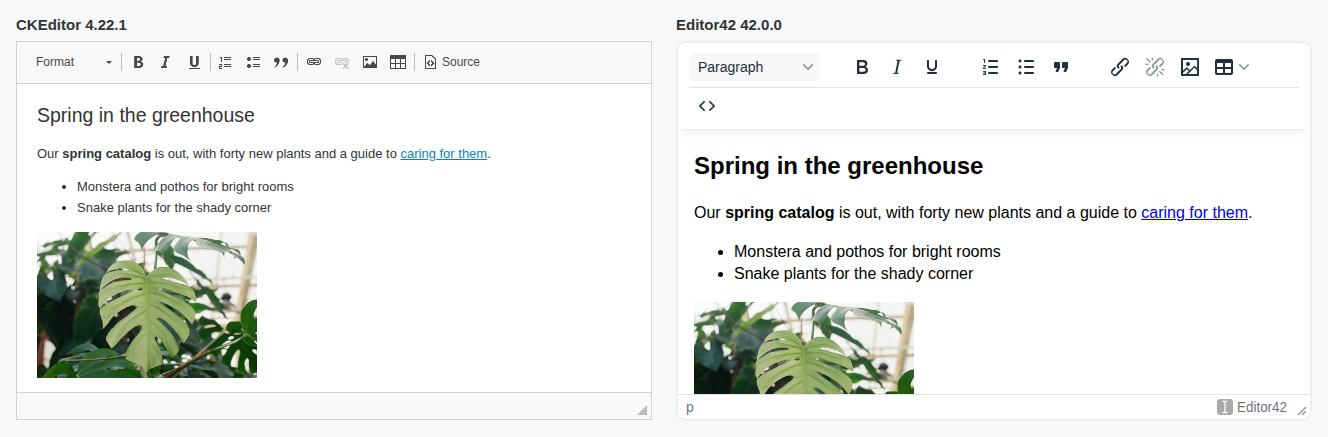
The open-source CKEditor 4 ended with version 4.22.1 on 30 June 2023. Its changelog now opens with "CKEditor 4 (the open source edition) is no longer maintained", and since 4.22 the editor itself compares its version with a list on ckeditor.com and tells your authors about it:
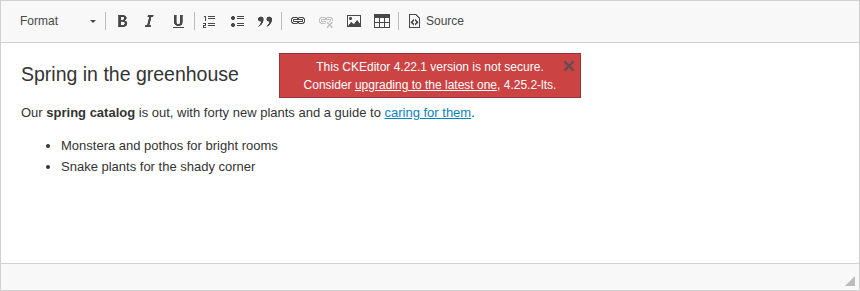
Versions 4.23 to 4.25 exist, but as paid long-term support from CKSource, which its latest changelog promises "security updates and critical bug fixes until December 2029". If you would rather not pay for an editor that gets no new features, there are two ways out: CKEditor 5, which is a different editor licensed under the GPL or commercially, or a TinyMCE-compatible editor. This guide takes the second way, to Editor42: a maintained, MIT-licensed fork of TinyMCE 6 that needs no license key and no account.
What changes, in short
| CKEditor 4.22.1 | Editor42 | |
|---|---|---|
| License | GPL, LGPL or MPL | MIT |
| Updates | None since June 2023, paid support since | Yes |
| Your content | Plain HTML in both: it moves as it is | |
| Your configuration and toolbar | Same ideas, new names (tables below) | |
| Your own plugins | Rewritten for the TinyMCE 6 plugin API | |
Step 1: take stock of your CKEditor 4 setup
Before you change anything, write down what your integration relies on, because each of these moves differently:
- the configuration: your
config.jsand the options you pass toCKEDITOR.replace(); - the plugins:
extraPlugins,removePluginsand any plugin you wrote yourself; - the toolbar;
- the content filter:
allowedContent,extraAllowedContentanddisallowedContent; - files and images:
filebrowserBrowseUrl,filebrowserUploadUrl,uploadUrl; - the code that talks to the editor:
getData(),setData(), events.
Step 2: load Editor42 instead of CKEditor 4
<!-- CKEditor 4 -->
<script src="/ckeditor/ckeditor.js"></script>
<script>
    CKEDITOR.replace("editor1");
</script>

<!-- Editor42 -->
<script src="https://cdn.editor42.com/editor42/latest/editor42.min.js"></script>
<script>
    editor42.init({
        selector: "#editor1"
    });
</script>
CKEditor's replace() takes the id or name of a textarea; Editor42's selector is a CSS selector, so #editor1 or textarea[name=editor1]. Like CKEditor, Editor42 writes its content back into the textarea when the form is submitted, so your server keeps receiving the same field. Editor42 is also on npm and can be hosted on your own server: see its installation options.
Step 3: translate the configuration
Most CKEditor 4 options have a direct counterpart:
| CKEditor 4 | Editor42 |
|---|---|
toolbar, toolbarGroups | toolbar, menubar |
extraPlugins, removePlugins | plugins: one list of what to load |
height, width | height, width |
language | language and language_url |
contentsCss | content_css |
bodyClass, bodyId | body_class, body_id |
format_tags | block_formats |
stylesSet | style_formats |
font_names, fontSize_sizes | font_family_formats, font_size_formats |
colorButton_colors | color_map |
readOnly | readonly |
startupFocus | auto_focus |
extraAllowedContent | extended_valid_elements |
disallowedContent | invalid_elements |
filebrowserBrowseUrl | file_picker_callback |
filebrowserUploadUrl, uploadUrl | images_upload_url |
scayt_autoStartup | browser_spellcheck: the browser's own spellchecker |
Two settings have no counterpart, allowedContent: true and enterMode: CKEDITOR.ENTER_BR: step 6 covers both. CKEditor 4 comes with 71 interface languages, while Editor42 itself is in English and loads another language from a file, which language_url points to.
Step 4: rebuild the toolbar
The buttons keep their meaning and change their names. Some live in plugins, which you list in plugins:
| CKEditor 4 button | Editor42 button | Plugin |
|---|---|---|
| Bold, Italic, Underline, Strike | bold, italic, underline, strikethrough | built in |
| Subscript, Superscript | subscript, superscript | built in |
| Format, Styles | blocks, styles | built in |
| Font, FontSize | fontfamily, fontsize | built in |
| TextColor, BGColor | forecolor, backcolor | built in |
| JustifyLeft, JustifyCenter, JustifyRight, JustifyBlock | alignleft, aligncenter, alignright, alignjustify | built in |
| Outdent, Indent, Blockquote | outdent, indent, blockquote | built in |
| HorizontalRule, RemoveFormat, PasteText, Print | hr, removeformat, pastetext, print | built in |
| Undo, Redo | undo, redo | built in |
| NumberedList, BulletedList | numlist, bullist | lists |
| Link, Unlink | link, unlink | link |
| Anchor | anchor | anchor |
| Image | image | image |
| Table | table | table |
| Iframe | media | media |
| SpecialChar, Smiley | charmap, emoticons | charmap, emoticons |
| Maximize | fullscreen | fullscreen |
| Source | code | code |
| Find, Replace | searchreplace | searchreplace |
| Preview, ShowBlocks | preview, visualblocks | preview, visualblocks |
| CodeSnippet | codesample | codesample |
| BidiLtr, BidiRtl | ltr, rtl | directionality |
| PageBreak, Templates | pagebreak, template | pagebreak, template |
A typical toolbar, before and after:
// CKEditor 4
CKEDITOR.replace("editor1", {
    toolbar: [
        ["Format", "Bold", "Italic", "Underline"],
        ["NumberedList", "BulletedList", "Blockquote"],
        ["Link", "Unlink", "Image", "Table"],
        ["Source"]
    ],
    height: 400
});

// Editor42
editor42.init({
    selector: "#editor1",
    plugins: "lists link image table code",
    toolbar: "blocks | bold italic underline | numlist bullist blockquote | link unlink image table | code",
    menubar: false,
    height: 400
});
Step 5: plugins without a counterpart
- Paste from Word. TinyMCE took the Word-specific cleanup out of its open-source paste in version 6.0, so Editor42 pastes from Word like any other HTML, through its content filter. Try it with the documents your authors really paste, or set
paste_as_text: trueto paste plain text only. - SCAYT and WebSpellChecker. Set
browser_spellcheck: trueto use the browser's spellchecker instead. - Easy Image, Export to PDF, MathJax and other plugins built on CKSource's services have nothing to connect to in Editor42.
- Your own plugins need rewriting for the TinyMCE 6 plugin API:
editor42.PluginManager.add()instead ofCKEDITOR.plugins.add(), andeditor.ui.registry.addButton()for their buttons. Before you start, look for a ready one among the plugins for Editor42.
Two plugins from our catalog that you may know from CKEditor 4 have Editor42 versions: the Flmngr file manager and the N1ED visual editor.
Step 6: files, images and uploads
CKEditor 4 opened a file browser at filebrowserBrowseUrl. Editor42 calls your file_picker_callback function instead, and you open your file manager from it and hand back the chosen URL. A file manager made for CKEditor 4 works here only through an integration of its own for TinyMCE or Editor42, if it has one; Flmngr has an Editor42 one.
Uploads change in one detail that is easy to miss: the server's answer. CKEditor 4 accepts JSON with uploaded and the file's url, while Editor42 expects the address of the uploaded image in location:
// What your upload script returns to CKEditor 4
{ "uploaded": 1, "fileName": "photo.jpg", "url": "/uploads/photo.jpg" }

// What it returns to Editor42 (images_upload_url)
{ "location": "/uploads/photo.jpg" }
Step 7: check your existing content
Editor42 reads the HTML CKEditor 4 saved, as it is. Like CKEditor's Advanced Content Filter, it keeps what its schema allows and drops the rest when the content loads, so look at what your content contains that the editor did not create.
- Captioned images from CKEditor 4's Enhanced Image plugin are
<figure class="image">elements. Editor42's image plugin writes the same markup, so withimage_caption: truethese images keep their captions and stay editable. allowedContent: trueis tempting to translate intovalid_elements: "*[*]". Do not: in our test with Editor42 42.0.0, that rule keptonerrorandonclickattributes and<script>elements in the saved HTML. Name the elements and attributes you need inextended_valid_elementsinstead.enterMode: CKEDITOR.ENTER_BRhas no counterpart: Editor42 always wraps text in blocks, a paragraph by default. Shift+Enter still inserts a line break. If your pages rely on text separated by<br>, check how they look.
The quickest test: open a few dozen real documents in Editor42, save them without changes and compare the HTML with the original.
Step 8: update the code that talks to the editor
| CKEditor 4 | Editor42 |
|---|---|
CKEDITOR.instances.editor1 | editor42.get("editor1") |
editor.getData() | editor.getContent() |
editor.setData(html) | editor.setContent(html) |
editor.insertHtml(html) | editor.insertContent(html) |
editor.updateElement() | editor.save() |
editor.checkDirty(), editor.resetDirty() | editor.isDirty(), editor.setDirty(false) |
editor.setReadOnly(true) | editor.mode.set("readonly") |
editor.destroy() | editor.remove() |
the instanceReady event | the init event, subscribed to in setup |
the change event | change, on each undo step, or input, on every keystroke |
editor42.init({
    selector: "#editor1",
    setup: function (editor) {
        editor.on("init", function () {
            // what you did on instanceReady
        });
        editor.on("change", function () {
            // what you did on change
        });
    }
});
Step 9: roll it out
- Go through your authors' everyday tasks with them: formatting, links, images, tables and pasting.
- Upload a file and an image, and pick an existing one.
- Open and save your real documents, as in step 7.
- Decide who gets the
codebutton: it lets an author write HTML directly. - If you can, switch a group of authors first and keep CKEditor 4 a setting away until they are happy.
Why not CKEditor 5?
CKEditor 5 is maintained, and if you want what it offers, it is a fine choice. But it is a new editor rather than the next CKEditor 4: your configuration and plugins are rewritten either way, it is licensed under the GPL or commercially and needs a license key, and it keeps only the markup its features know, so old content needs the same careful check. The move to Editor42 is about the same amount of work, and it ends on an MIT license with no key. If you are weighing TinyMCE's own versions too, our guide to the end of TinyMCE 6 compares them.
Editor42 is made by the team behind Pluginza.
- TinyMCE 6 end of life: what to do in 2026
- How to migrate from CKEditor 4 to Editor42